Botly v2 is here: better quality suggestions, smarter replies, and a big upgrade overall.
Read what's newBotly v2 is here – and it’s a big one!
Published on March 24, 2026
Read time 5 minutes
By Leo
If you’ve been using Botly, first of all – thank you. Seriously. Building this has been one of the most rewarding things I’ve done, and seeing people actually use it every day is what keeps me going.
That said, v1 grew messy over time. Features got bolted on, weird edge cases piled up, and some things just didn’t work the way I wanted them to. So instead of patching, I rebuilt the core from scratch. Botly v2 is cleaner, more predictable, and actually lovely to use.
Let me walk you through what’s new.
Suggestions that actually land
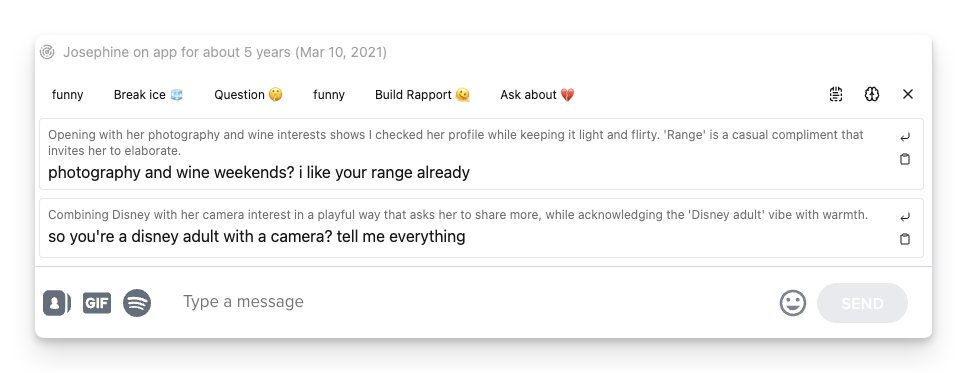
This is the change you’ll notice first. Botly v2 now gives you 1 or 2 suggestions per request. No more weird formatting or “what did it even try to say” moments.
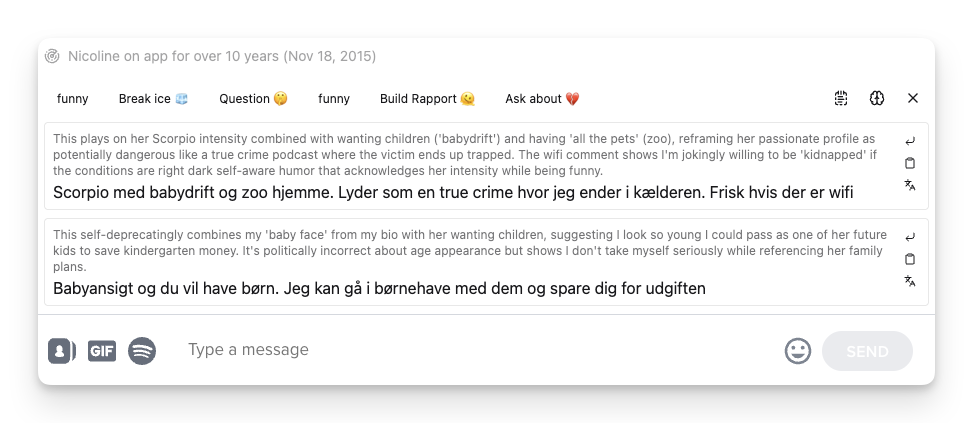
Each suggestion shows up in its own card with a short reasoning above it – a little note about the angle or strategy the AI went for. Think of it as the AI briefly telling you why it wrote what it wrote, so you can pick the one that matches your vibe.
From there you can Insert the text straight into your chat, Copy it, or hit Translate if it’s in a different language than your browser. That last one is my favorite since I used to travel a lot. Especially when you’re chatting with someone in their native language and want to quickly check what a suggestion actually says.
Oh, and it doesn’t matter anymore whether the last message was yours or theirs – suggestions work great either way. That was a real pain point before when using the Resurrect Prompt (which would essentially try to suggest a message when we got ghosted).
Battle mode? Just Botly now
If you liked the old Battle feature, where you’d get 3 or more suggestions and pick the winner – that’s now just part of how Botly works. Set suggestions to 2 (the default) and you’ve got your battle. No separate mode, no extra toggles. One experience, less confusion.
Your settings, your call
The new settings panel keeps things simple. You get to choose:
- How many suggestions per run – flip between 1 and 2 with a single tap.
- Which AI model to use – browse and pick any model you want, paired with your own API key. You’re not locked into anything.
- Whether to see shared prompts from other users – a toggle to show or hide pre-made prompts. In the future, this will also include community prompts (a wish for the future).
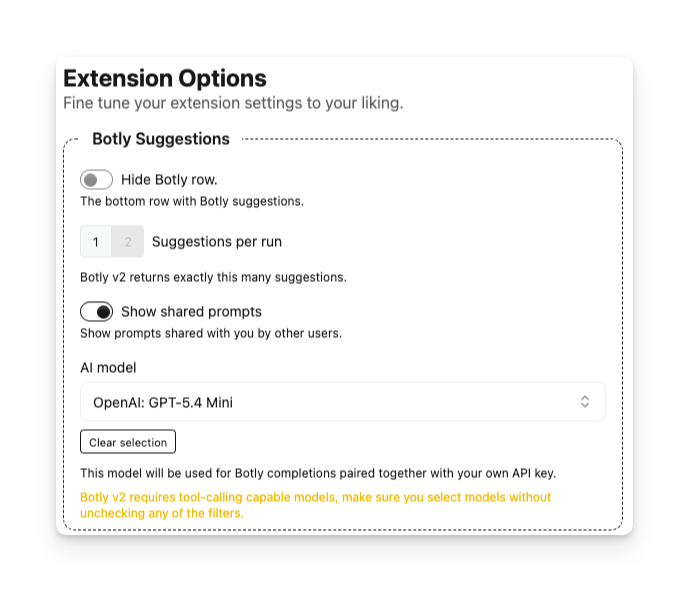
One important thing the settings page will tell you (in a friendly amber warning): Botly v2 needs models that support tool-calling. Most popular models do, so you’re probably fine, but if you’re using something niche, just make sure the filters stay checked when browsing models. Otherwise the completions won’t work.
If something doesn’t work as expected, please reach out, I won’t bite.
A prompt editor that doesn’t hide things from you
The Prompt Editor has been refreshed to be more transparent – you can now see exactly what gets sent to the AI, no guesswork. This is because previously i had to write a fancy logic to remap your messages to the AI messages but this wouldn’t really work because who ever has a conversation on a dating app like one has on the chat gpt thread.
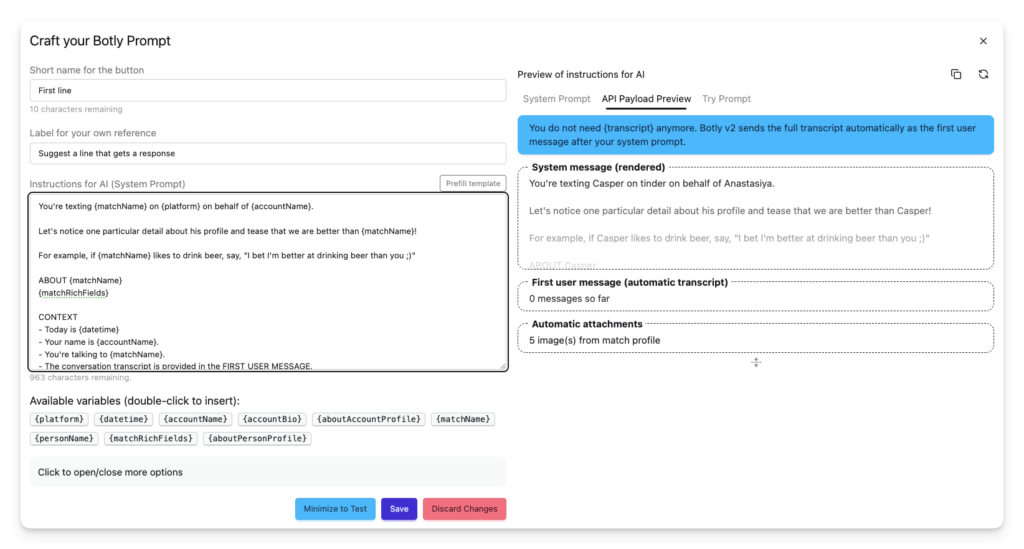
Anyways. It has three tabs on the right side:
- System Prompt – your instructions, rendered with all variables filled in so you can see exactly how they look.
- API Payload Preview – the full picture: your system message, the conversation transcript (sent automatically as the first user message), and any attachments. This is literally what leaves your browser.
- Try Prompt – a sandbox to test your prompt live before using it in a real conversation. The dropdown for choosing a model is just a link from settings. It does the same thing and you don’t have to actually change it.
I am rooting that this will inspire more of you to improve the prompt and actually make them feel like yours.
The editor also watches out for you. If you’re using old patterns that don’t apply anymore (like the {transcript} variable), it’ll show a clear blue banner explaining what changed and what to do instead.
In v2, your chat history is always sent automatically in the right place – you don’t need to manually include it anymore.
For the curious: the Inspect panel
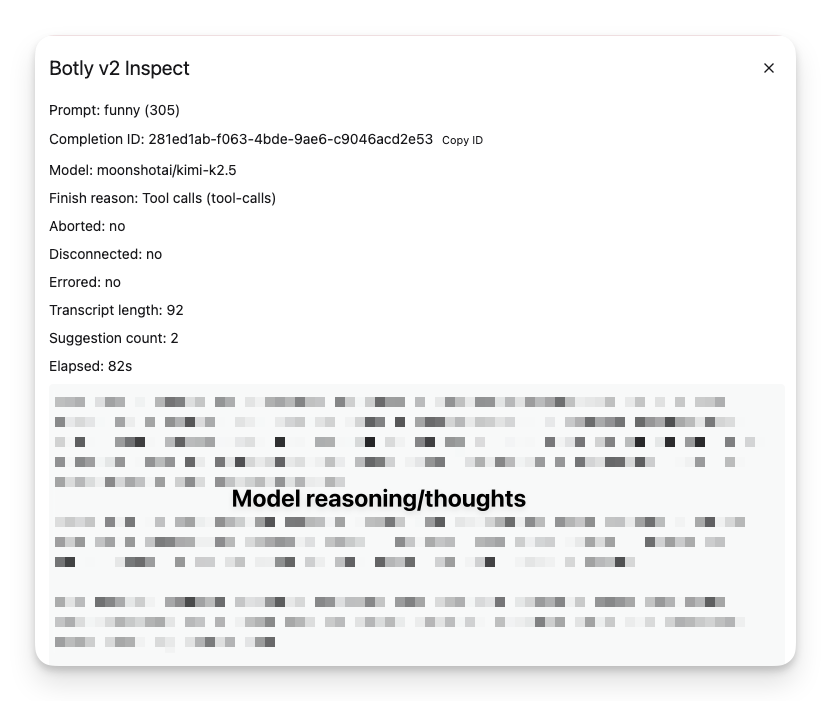
The one for the nerds. Just like YouTube has its own stats. After any suggestion, you can hit Inspect to see what happened behind the scenes:
- Which model was used
- How the AI finished (tool calls, stop token, etc.)
- How long the transcript was
- How many suggestions were generated
- The elapsed time
- And, if the model supports it, the AI’s full thinking process before it wrote the suggestion
If you want to understand why a particular suggestion came out a certain way, or if you want to debug something, or even if you just want to copy the reasoning and try it in another platform – it’s all there.
What this means for you
Your suggestions will be better. Cleaner outputs, fewer “huh?” moments, more reliable across different models and languages.
Your prompts will be easier to get right. The editor shows you everything, warns you about mistakes, and handles the tricky parts automatically.
When things break, you’ll know why. No more silent failures. Clear messages, inspect tools, and full transparency into what’s happening.
One last thing
Botly updates itself automatically – so most of you are already on v2 without having to do anything. If things feel off or suggestions aren’t generating, just restart your browser and you should be good to go. Chrome sometimes holds onto the old version until you do.
Once you’re updated, your prompts may need a small refresh. The editor will walk you through what changed. Please don’t be lazy.
I really hope you feel the difference.